idealista
- 4.8
- Rating
- 10.00M
- Installs
- Free
- Price

 Analysis by App-foxy
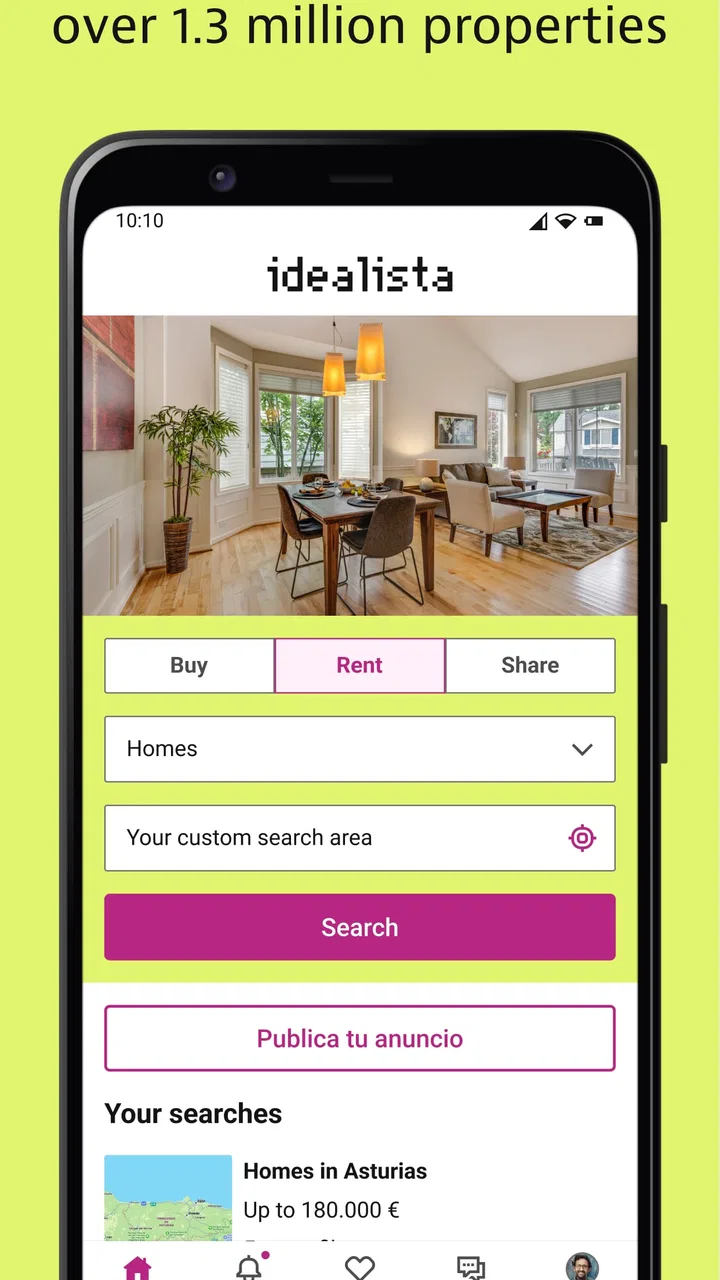
Searching for a home is already tiring before you add unfamiliar neighborhoods, changing prices, and a long list of personal requirements. I found idealista most useful when I treated it as a focused property-search workspace rather than a complete replacement for every other housing resource. It is a free House & Home app from idealista, designed around property searches in Spain, Italy, and Portugal, and its large audience makes it a natural starting point for anyone looking in those markets.
My review focuses especially on how comfortably different people can use it: someone reading on a small phone, a person comparing homes while commuting, a user with limited dexterity, or somebody who needs to reduce visual and mental overload. The experience is not equally convenient in every situation, but its central task is clear. You enter an area, shape the search, inspect listings, and decide which homes deserve closer attention.
How idealista handles everyday property searching
I use idealista most effectively when I treat each search as a small decision-making task, not an invitation to scroll indefinitely. In this section, I’ll explain how its focused property-search approach helps me move from a broad housing need toward a manageable set of options. That distinction matters most when time, attention, or energy is limited.
You May Also Like

 AccuWeather: Weather Radar
AccuWeather Review: A Quick, Clear Forecast for Everyday Decisions
For everyday plans, the best forecast is the one you can understand quickly. AccuWeather makes rain timing, radar, and local conditions easy to act on, with a few trade-offs.

 Hill Climb Racing
Why Hill Climb Racing Still Turns Crashes Into One More Run
A tiny car, a bumpy hill and one more upgrade: Hill Climb Racing keeps resurfacing because its simple chaos makes every near-miss feel personal.

 AliExpress - Shopping App
AliExpress Makes Global Shopping Feel Personal, but Shoppers Bear the Risk
AliExpress turns a global marketplace into a pocket-sized discovery engine. Its reach is useful, its shopping loop compelling, and its trade-offs easy to miss.

 Lords Mobile: Kingdom Wars
Lords Mobile Is a Kingdom-Building Routine, Not a Quick Match
A case-by-case verdict on the building, battles, device demands, and social commitments that make Lords Mobile rewarding for some players and exhausting for others.

 PDF Scanner app - TapScanner
TapScanner Makes Paperwork Easier to Capture, Check, and Share
TapScanner makes scanning with a phone feel less like a rescue operation and more like a dependable step in getting work done. Its capture tools are useful, though not flawless.

 Block Blast!
 Shows How Much a Puzzle Game Can Leave Out
A quiet grid game shows why puzzle players increasingly value instant clarity, repeatable skill and low-pressure play—and where the genre still needs to catch up.
More From Our News Desk
View All News


Readable results and a navigation style that stays focused
The strongest part of the app is its direct purpose. It does not ask me to move through unrelated content before reaching property results. That matters when I am searching with a specific goal, such as finding a long-term rental near work or checking whether buying in a particular district is realistic. The app’s identity is immediately understandable, which lowers the learning curve for first-time users.
Property searching can still become visually demanding because every listing competes for attention. Photos, location information, prices, and descriptions all matter, but I do not want to inspect each one in full. I found it more manageable to use the search controls first, then open only the homes that fit my basic needs. This is a simple habit, but it prevents the results screen from becoming an endless stream of attractive yet unsuitable properties.
My practical advice is to begin with the least negotiable requirement. If the location is fixed, start there. If the budget is the real limit, make that the first filter. Adding every preference immediately can make a search feel too narrow, while leaving everything open creates too much noise. I prefer a two-pass workflow: first find a useful pool of homes, then refine it after seeing what the local market actually offers.
The app is also easier to use when I keep a small note outside it with the questions I need answered. For example: Is the bedroom count genuinely suitable? Is the property furnished? Does the location work without a car? This stops me from relying on memory when several listings look similar. It is a particularly helpful approach for people who find comparison tasks mentally tiring.
On a phone, readability depends heavily on the individual listing and the amount of information presented. Some descriptions are naturally clearer than others, and property photography can vary in usefulness. A bright, tidy photo does not tell me enough about circulation space, noise, stairs, or the distance to daily services. I therefore treat images as an initial screening tool, not as proof that a home will work in practice.
The large user response gives the service a reassuring sense of relevance. The app has an average rating of 4.8 from around 442 thousand ratings, and it has passed 10 million installs. Those figures do not guarantee that every search will be successful, but they suggest that idealista has become a familiar tool for a substantial number of people looking in its three main countries.
Making the interface work for different reading needs
For users who read slowly, have dyslexia, experience visual fatigue, or simply dislike dense screens, the best approach is to avoid making decisions directly from the first glance. I would open a promising listing, read its key details in a quiet moment, and write down only the facts that affect the decision. This is more reliable than repeatedly scanning a crowded results page.
People with reduced vision may also benefit from using the phone’s own display settings, such as larger text or increased contrast, where those settings are available on their device. I would not assume that enlarging everything will improve the experience automatically: larger text can also mean more scrolling and less context on screen. The useful balance depends on whether the priority is reading descriptions or comparing several homes quickly.
One non-obvious advantage of a dedicated property app is that it supports a repeatable routine. I can search one area, examine a few candidates, and return later with the same purpose instead of rebuilding the process across unrelated websites. That consistency helps users who become overwhelmed by changing layouts or too many sources. It also makes it easier to share a shortlist with a partner or family member for a second opinion.
At the same time, I would not describe the app as effortless for everyone. Property vocabulary can be confusing, especially when searching across countries or in a language that is not your strongest. A user may understand the general description while missing an important local term. When accessibility or mobility is central to the decision, I would verify the wording with the advertiser rather than assuming that a casual phrase means a specific physical feature.
Motor control, touch interaction, and sensory load
Most housing searches involve repeated tapping, scrolling, opening listings, returning to results, and comparing details. That can be uncomfortable for somebody with hand pain, tremors, limited reach, or fatigue. I found that the most sustainable method is to search in short sessions and avoid treating every result as a candidate. The app is much less demanding when I narrow the field before opening individual properties.
A user with motor difficulties may prefer holding the phone steady on a table rather than browsing one-handed while walking. This is not just a comfort tip. When a listing contains important details in several places, accidental taps or rapid scrolling can cause me to miss information. A stable setup also makes it easier to zoom into photographs when checking entrances, bathrooms, balconies, or possible obstacles.
For people sensitive to visual stimulation, property photography can be the most tiring part of the experience. Images are useful, but a long sequence of rooms, close-ups, and exterior views can make it difficult to remember what has been seen. I recommend stopping after the first screening and recording a simple judgment: worth contacting, possible backup, or discard. This reduces the need to revisit the same visual material repeatedly.
Users with hearing loss are not disadvantaged by the basic act of reading property information, but communication can still become a barrier once the search moves beyond the app. A written description may be clear while a later conversation with an advertiser is not. If a particular feature matters, I would prepare the question in writing and keep the answer for reference. That is especially important for details such as step-free access, lift availability, bathroom layout, or permission to adapt a room.
People with attention difficulties may find the open-ended nature of property hunting harder than the interface itself. There are always more listings to inspect, and a low-quality match can still look tempting. I use a strict stopping rule: once I have enough realistic candidates for the day, I stop searching and compare them. This turns the app from an infinite browsing exercise into a manageable decision process.
Using it in real situations, not just at home
A realistic example is a person commuting between work and home while trying to rent in a new city. They may have only a few minutes at a time, limited mobile attention, and a need to remember which areas are practical. In that situation, idealista works best as a quick triage tool. I would search a defined area, remove obviously unsuitable homes, save notes externally, and return later for a deeper review rather than trying to complete the entire decision on a crowded train.
Another useful scenario is a family member helping someone who cannot comfortably browse for long periods. One person can perform the initial search while the other supplies the requirements: floor level, access concerns, preferred transport, or distance from support services. The app becomes a shared shortlist rather than a solitary task. That division of labor can make the process more inclusive, although every important detail still needs confirmation with the advertiser.
For someone relocating from another country, the app’s focus on Spain, Italy, and Portugal is more useful than a general classifieds tool that mixes many unrelated markets. It gives the search a clear geographic purpose. However, I would still compare results with local agencies and other property sources when the move is important. A single platform may be convenient, but convenience should not be mistaken for complete market coverage.
Traveling users should also be careful about context. Looking at a home while walking, in a noisy café, or under poor lighting is suitable for collecting possibilities, not making a final judgment. Photos and descriptions cannot replace checking the surrounding streets, transport options, or the practical route from the entrance to the parts of the home that matter most. I see the app as the first stage of a housing decision, not the whole decision.
Where the app still creates barriers
The biggest limitation is not a missing convenience feature; it is the nature of property information itself. Accessibility is often described inconsistently, and a listing may not answer the questions that matter to a wheelchair user, a person with balance difficulties, someone sensitive to noise, or a family supporting an older adult. I would never treat a vague accessibility claim as enough evidence. Ask for precise details and, when possible, inspect the property personally or arrange a trusted video walkthrough.
Descriptions can also encourage false confidence. A phrase that sounds positive may conceal a narrow hallway, a step at the entrance, a steep street, or a bathroom that cannot accommodate the user’s needs. My workaround is to turn broad requirements into measurable questions: How many steps are there from the pavement? Is there a lift from ground level? What is the shower arrangement? Can a mobility aid pass through the main doors? Specific questions produce more useful answers than asking whether a property is simply “accessible.”
Another friction point is cognitive comparison. A property can be suitable in one respect and unsuitable in another, and the app cannot make that personal trade-off for me. A low price may come with a difficult commute; a central location may bring noise; a beautiful interior may have an impractical entrance. I recommend ranking requirements before searching and refusing to let attractive photography override the ranking.
There is also a financial consideration for people who want to keep the process completely free. The app itself is free, but it includes in-app purchases ranging from $5.49 to $289.99 per item. I would not assume that paying is necessary for a basic search, and I would examine what an optional purchase changes before spending money. For a casual browser or someone still exploring locations, the free starting point is likely enough to decide whether the app fits their routine.
The current version is 14.3.3 and it supports devices running Android 8.0 or later. That makes it usable on a range of phones, although the quality of the experience will still depend on the device’s screen, performance, and system settings. Users on older hardware should keep expectations practical: a smaller display can make comparison harder even when the app itself opens normally.
Who should choose idealista, and who should look elsewhere?
I would recommend it to people searching for property in Spain, Italy, or Portugal who want a clear place to begin. It is particularly useful for renters, buyers, and relatives helping with a move, provided they are willing to verify important details rather than accepting a listing at face value. Its free entry point, focused geographic scope, and broad adoption make it a sensible first search rather than an obscure specialist tool.
I would be more cautious if your search depends on highly specific accessibility requirements, legal certainty, or exhaustive local coverage. In those cases, the app can help identify possibilities, but a local agent, direct advertiser conversation, specialist housing organization, or in-person inspection may be better for the decisive stage. Someone who only wants a quick visual tour may also prefer a simpler property website, while someone comparing multiple countries outside the app’s focus should use a broader service.
The age rating is Everyone, which fits the app’s practical housing purpose. That does not mean every listing or contact situation is equally suitable for every person, so younger users and anyone unfamiliar with renting should still involve a trusted adult when discussing money, documents, or visits. The label describes the app’s general audience, not a guarantee that every real-world housing interaction will be risk-free.
My inclusive verdict after using it
idealista succeeds because it gives a complicated task a recognizable starting point. I can use it to move from “I need a home” to a realistic set of properties without first learning an elaborate system. For many users, that focus is more valuable than a long list of extras. The app is free, available for Everyone, and developed by idealista, with a strong reputation reflected in its 4.8 average and millions of installs.
Its inclusive value depends less on a single setting and more on how deliberately I use it. Short sessions help with fatigue. External notes help with memory. Phone display adjustments can improve reading. Specific questions help expose unclear accessibility claims. A second person can reduce the burden of comparing listings. These habits do not fix every barrier, but they make the search more usable across different abilities and circumstances.
My final recommendation is straightforward: use it as a disciplined first step, not as unquestionable evidence about a property. Narrow the search, inspect listings calmly, record the details that matter, and verify anything involving access, safety, cost, or daily travel. For finding plausible homes in its target countries, idealista is a strong and practical choice; for proving that a home will truly meet an individual’s needs, human follow-up remains essential.
FAQs for idealista
01What is idealista and how does it work?
Idealista is a real estate app designed to help users find properties for rent or purchase across various locations. Users can search for homes, apartments, and commercial spaces using filters like price range, location, and property features. The app provides detailed listings with photos, descriptions, and contact information for real estate agents or property owners.
02Is idealista free to use?
Yes, idealista is free to download and use for browsing and searching properties. However, there may be additional features or advertising options available for real estate agents or property owners who wish to list their properties on the platform. Users can access most of the app’s functionalities without any cost.
03How accurate are the property listings on idealista?
Idealista strives to ensure the accuracy of its property listings by allowing real estate professionals and property owners to update their listings. However, availability and pricing can change rapidly, so it's recommended to contact the listing agent or owner directly through the app to confirm details and schedule viewings.
04Can I save my favorite properties on idealista?
Yes, idealista allows users to save their favorite properties for easy access later. By creating an account, users can bookmark listings and even receive notifications about changes in price or availability. This feature helps users keep track of potential properties they are interested in without having to search repeatedly.
05Is idealista available in multiple languages?
Idealista supports multiple languages to cater to a diverse user base. Users can change the language settings within the app to their preferred language, making it accessible and user-friendly for international users. This feature ensures that users from different linguistic backgrounds can navigate the app with ease.
Pros
- User-friendly interface for easy navigation.
- Comprehensive search filters enhance results.
- Real-time notifications for new listings.
- Detailed property descriptions and photos.
- Multilingual support for international users.
Cons
- Limited offline access to property details.
- Some listings may be outdated or inaccurate.
- Occasional app crashes on older devices.
- In-app ads can be somewhat intrusive.
- Limited customer service response time.

idealista
Gallery